ShortcutKeys
© 2004-2005 Jethro Beekman
ShortcutKeys is a program that will intercept keypresses when the shortcut key (pause) is toggled. It will match the typed string with a defined keybinding and handle accordingly.
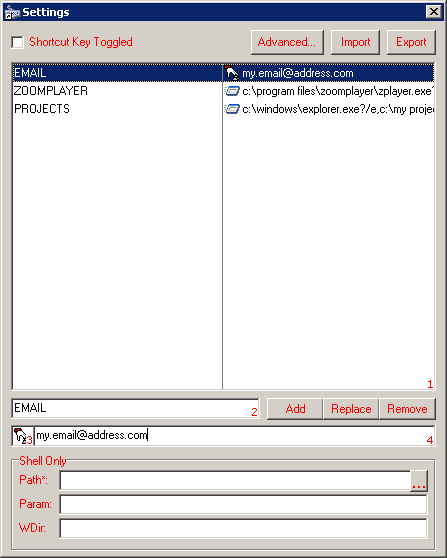 Shortcut Key Toggled: Is the program currently intercepting keypresses for evaluation?
Advanced...: Advanced settings.
Import: Import keybinds from a .dat file.
Export: Export keybinds to a .dat file.
Add: Add the current binding to the list.
Replace: Replace the current keybinding with the currently selected one in the list.
Remove: Remove the currently selected keybinding from the list.
Shell Only: Options only for 'shell' action. The actionstring will be automatically composed in this way:
Path?Param?WDir
Path*: (Required) Path to the file to be shelled.
Param: Parameters for the executable (if applicable).
WDir: Working directory for the executable (if applicable).
...: Browse for a file.
1: The list of currently active keybindings. On the left side: the required keystroke. On the right side: the actionstring.
2: The current keystroke. Accepted characters: A-Z,0-9.
3: The current action type. Choose between: Shell, Keyboard. Shell: ShellExecute the given actionstring. Keyboard: Virtually type the action string.
4: The current actionstring. See 3.
Hotkeys
Press the following keys when the shortcutkey is toggled:
Esc: Shut down ShortcutKeys
F1: Show ShortcutKeys about box
F11: Show ShortcutKeys settings panel